APK.GOLD
Apk files for Android
Short info
In general apk file StandBy Mode: Clock & Widgets has rating is 8.6 from 10. This is cumulative rating, most best apps on google play store have rating 8 from 10. Total reviews in google play store 29744. Total number of five star reviews received 21934. This app has been rated like bad by 3745 number of users. Estimated number of downloads range between 1,000,000+ downloads in google play store StandBy Mode: Clock & Widgets located in category Personalization, with tags and has been developed by Zetabit Tecnologia. You can visit their website https://he49abe4d.app-ads-txt.com or send zetabitbr@gmail.com to them. StandBy Mode: Clock & Widgets can be installed on android devices with 6.0(Marshmallow)+. We provide only original apk files. If any of materials on this site violates your rights, report us You could also download apk of StandBy Mode: Clock & Widgets and run it on android emulators like bluestacks or koplayer. Versions of StandBy Mode: Clock & Widgets apk available on our site: 2.4.0.584, 2.3.3.582, 2.3.1.580, 2.2.9.577, 2.2.8.576 and others. Last version of StandBy Mode: Clock & Widgets is 2.4.0.584 was uploaded November 25, 2026
Screenshots of StandBy Mode: Clock & Widgets
  • StandBy Mode: Clock & Widgets
  • StandBy Mode: Clock & Widgets
  • StandBy Mode: Clock & Widgets
  • StandBy Mode: Clock & Widgets
  • StandBy Mode: Clock & Widgets
  • StandBy Mode: Clock & Widgets
  • StandBy Mode: Clock & Widgets
  • StandBy Mode: Clock & Widgets
  • StandBy Mode: Clock & Widgets
  • StandBy Mode: Clock & Widgets
  • StandBy Mode: Clock & Widgets
  • StandBy Mode: Clock & Widgets
  • StandBy Mode: Clock & Widgets
  • StandBy Mode: Clock & Widgets
  • StandBy Mode: Clock & Widgets
  • StandBy Mode: Clock & Widgets
  • StandBy Mode: Clock & Widgets
  • StandBy Mode: Clock & Widgets
  • StandBy Mode: Clock & Widgets
  • StandBy Mode: Clock & Widgets
  • StandBy Mode: Clock & Widgets
  • StandBy Mode: Clock & Widgets
  • StandBy Mode: Clock & Widgets
  • StandBy Mode: Clock & Widgets
  • StandBy Mode: Clock & Widgets
  • StandBy Mode: Clock & Widgets
Description of StandBy Mode: Clock & Widgets (from google play)

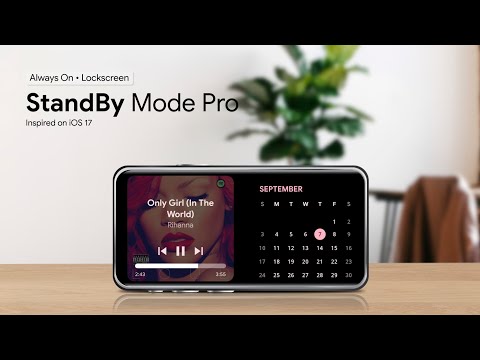
StandBy Mode brings the iOS StandBy screen to Android: an always on display (AOD) desk clock and night clock with widgets, shown while your phone, tablet or foldable charges. Next to the clock you can show your music, calendar, weather and more, large enough to read from across the room.

Choose from more than 100 clock faces, put two, three or four widgets side by side, and set the app to open by itself when you plug in the charger.

Full screen clocks
Digital clock with date, segmented LCD clock, flip clock, neon clock, analog clock with digital time, solar clock, Matrix, pixel art, word clock, Roman numerals, world clock and a big Pixel-style crop clock. Each one lets you change colors, fonts and sizes, so the same app works as a bedside clock or as a desk clock in a home office. The dementia clock shows the full date, the day of the week and the time of day (morning, afternoon, night) in large text.

Always on display and night mode
The AMOLED clock shows white digits on pure black, which makes it a good night clock: you can check the time without lighting up the room. Night Mode dims the screen and tints it red, on a schedule or with the light sensor, and you can set a separate brightness for day and night. Pixel shifting helps protect OLED screens from burn-in, and a sleep timer can turn the screen off after a set time.

Starts and stops on its own
Open the app when you plug in, only on wireless charging, only on Wi-Fi, only when the screen is off, or on a schedule. It can appear over the lock screen and close again when you unplug, and it also works as the Android screensaver, so the clock shows up when the device is docked or idle. The charging screen shows the battery level and how long until it is full.

Widgets side by side
In the Duo layout, the most used widgets are the digital clock, the music player, the calendar and the System Dashboard, which shows battery and storage. There are also analog and AMOLED clocks, battery widgets in several styles, weather, photos, quotes, GIFs, a to-do list, timers and any widget from the apps on your home screen. Small complications on the edges of any screen add the next alarm, the date, battery or progress through the year. The widget rotator can cycle through your favorites.

Music player with lyrics
Control Spotify, YouTube Music, Apple Music, Deezer and other apps from a music widget or a full screen player that shows the lyrics as the song plays.

Digital photo frame and weather clock
Use an old phone or tablet as a photo frame; the crop follows faces, so people stay in the picture. Weather clocks put the current weather and the forecast next to the time.

Focus and productivity
Pomodoro timer with focus insights, full screen timer, countdown, stopwatch, calendar agenda, tally counters, a sobriety counter and a calculator. Focus mode lets you pick which notifications can appear while StandBy Mode is open, and Spaces keep separate setups for home, work and focus.

Dashboards and extras
Command Center puts the clock, weather, agenda, audio and battery on one screen, and Starship Console shows the clock, weather, schedule and power readouts as a retro sci-fi display. Vibes plays lo-fi and study radio over calm visuals, and seasonal effects add falling snow in winter.

Phones, tablets and foldables
Turn an old tablet into a smart display on the kitchen counter or the nightstand. The app works in landscape and portrait and is translated into more than 20 languages.

Privacy policy: https://zetabitapps.com/privacy-policy
Support: support@zetabitapps.com

Version history StandBy Mode: Clock & Widgets
New in StandBy 2.4.0.584
NEW
• Design: New Material 3 Expressive look across the app
• Settings: Grouped settings and a time picker for schedules
• Permissions: Clearer full-screen permission requests

FIXES & IMPROVEMENTS
• Weather: Fix not working with approximate location
• Duo: Fix widgets from other apps freezing after editing
• Player: Fix audiobooks restarting on skip
• Foldables: Tent mode glow only on the inner screen
• Fix text cut off on small phones
• Fix some crashes
Advertisement
Please rate this app
More info
Select the StandBy APK that fits your device

PermissionsStandBy Mode: Clock & Widgets 2.4.0.584

High-risk access inside

  1. No alerts
  2. Worth checking
  3. High risk

Alerts

High risk (1)

  • Notification accessnotification-listenerReads all notifications, including login codes

Worth checking (1)

  • Display over other appsSYSTEM_ALERT_WINDOWDraws on top of other apps

Good to know (2)

  • Advertising IDACCESS_ADSERVICES_AD_IDAD_IDUsed for ads and ad measurement
  • In-app purchasesBILLINGPaid content through Google Play

35 permissions in total

Source: AndroidManifest.xml of this APK

Switched on in Settings5
  • Run foreground service with the type "specialUse" Android 14+Allows the app to make use of foreground services with the type "specialUse"
  • Show live updates Android 16 QPR2+Allows the app to display ongoing, time-sensitive notifications on the status bar and lock screen
  • Schedule precisely timed actionsThis app can schedule work to happen at a desired time in the future. This also means that the app can run when you’re not actively using the device.
  • Display over other appsCan appear on top of other apps or other parts of the screen. This may interfere with normal app usage.
  • Display notifications as full screen activities on a locked deviceAllows the app to display notifications as full screen activities on a locked device
Needs your OK7

Location

  • Access approximate location only in the foreground
  • Access precise location only in the foreground

Phone

  • Read phone status and identity

Calendar

  • Read calendar events and details

Photos and videos

  • Read image files from shared storage Android 13+

Files

  • Read the contents of your shared storage

Notifications

  • Show notifications Android 13+
Given at install23
  • Access Do Not Disturb
  • Check the Google Play license
  • Control vibration
  • Disable your screen lock
  • Get ad topics based on your app use (Android ad services)
  • Have full network access
  • In-app purchases through Google Play
  • Learn how the app was installed (install referrer)
  • Measure ad clicks and installs (Android ad services)
  • Pair with Bluetooth devices
  • Prevent phone from sleeping
  • Read Google services configuration
  • Receive push messages
  • Run at startup
  • Run foreground service
  • Run foreground service with the type "mediaPlayback" Android 14+
  • Schedule alarms or event reminders Android 13+
  • Use biometric hardware
  • Use fingerprint hardware
  • Use the advertising ID
  • Use the advertising ID (Android ad services)
  • View network connections
  • View Wi-Fi connections

Device must have

Any Android device will do

Permission changes

The list has not changed since version 2.3.1.580.

Android Version Requirements for StandBy Mode: Clock & Widgets

How the minimum Android version needed by StandBy Mode: Clock & Widgets has changed across the versions in the apk.gold catalog. Tap a point on the chart to check a specific version.

2.4.0.584Nov 25, 2026Android 12L+, target 17
Minimum AndroidTarget Android

The current StandBy Mode: Clock & Widgets 2.4.0.584 runs on Android 12L and later and targets Android 17. In 2024, version 1.1.238 needed only Android 6.0.

Phone on an older Android? Newest versions that still work: Android 10: 2.3.1.580 (Nov 2026); Android 7.0: 1.8.9.476 (Jan 2026).

Other StandBy APK versions for android 12.1
Popular android apps