APK.GOLD
Apk files for Android
Short info
In general apk file StandBy Mode: Clock & Widgets has rating is 9.3 from 10. This is cumulative rating, most best apps on google play store have rating 8 from 10. Total reviews in google play store 29621. Total number of five star reviews received 21955. This app has been rated like bad by 3965 number of users. Estimated number of downloads range between 1,000,000+ downloads in google play store StandBy Mode: Clock & Widgets located in category Personalization, with tags and has been developed by Zetabit Tecnologia. You can visit their website https://he49abe4d.app-ads-txt.com or send zetabitbr@gmail.com to them. StandBy Mode: Clock & Widgets can be installed on android devices with 6.0(Marshmallow)+. We provide only original apk files. If any of materials on this site violates your rights, report us You could also download apk of Google and run it using android emulators such as big nox app player, bluestacks and koplayer. You could also download apk of StandBy Mode: Clock & Widgets and run it on android emulators like bluestacks or koplayer. Versions of StandBy Mode: Clock & Widgets apk available on our site: 2.3.1.580, 2.2.9.577, 2.2.8.576, 2.2.7.575, 2.1.23.562 and others. Last version of StandBy Mode: Clock & Widgets is 2.3.1.580 was uploaded 2026/08/11
Screenshots of StandBy Mode: Clock & Widgets
  • StandBy Mode: Clock & Widgets
  • StandBy Mode: Clock & Widgets
  • StandBy Mode: Clock & Widgets
  • StandBy Mode: Clock & Widgets
  • StandBy Mode: Clock & Widgets
  • StandBy Mode: Clock & Widgets
  • StandBy Mode: Clock & Widgets
  • StandBy Mode: Clock & Widgets
  • StandBy Mode: Clock & Widgets
  • StandBy Mode: Clock & Widgets
  • StandBy Mode: Clock & Widgets
  • StandBy Mode: Clock & Widgets
  • StandBy Mode: Clock & Widgets
  • StandBy Mode: Clock & Widgets
  • StandBy Mode: Clock & Widgets
  • StandBy Mode: Clock & Widgets
  • StandBy Mode: Clock & Widgets
  • StandBy Mode: Clock & Widgets
  • StandBy Mode: Clock & Widgets
  • StandBy Mode: Clock & Widgets
  • StandBy Mode: Clock & Widgets
  • StandBy Mode: Clock & Widgets
  • StandBy Mode: Clock & Widgets
  • StandBy Mode: Clock & Widgets
  • StandBy Mode: Clock & Widgets
  • StandBy Mode: Clock & Widgets
Description of StandBy Mode: Clock & Widgets (from google play)

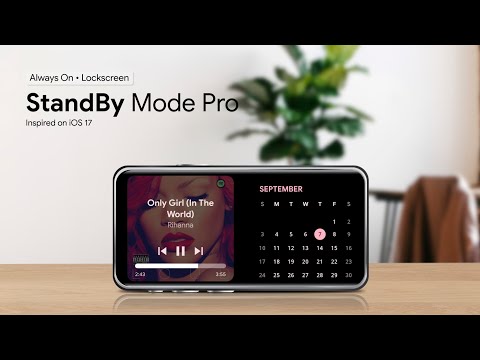
StandBy Mode brings the iOS StandBy screen to Android: an always on display (AOD) desk clock and night clock with widgets, shown while your phone, tablet or foldable charges. Next to the clock you can show your music, calendar, weather and more, large enough to read from across the room.

Choose from more than 100 clock faces, put two, three or four widgets side by side, and set the app to open by itself when you plug in the charger.

Full screen clocks
Digital clock with date, segmented LCD clock, flip clock, neon clock, analog clock with digital time, solar clock, Matrix, pixel art, word clock, Roman numerals, world clock and a big Pixel-style crop clock. Each one lets you change colors, fonts and sizes, so the same app works as a bedside clock or as a desk clock in a home office. The dementia clock shows the full date, the day of the week and the time of day (morning, afternoon, night) in large text.

Always on display and night mode
The AMOLED clock shows white digits on pure black, which makes it a good night clock: you can check the time without lighting up the room. Night Mode dims the screen and tints it red, on a schedule or with the light sensor, and you can set a separate brightness for day and night. Pixel shifting helps protect OLED screens from burn-in, and a sleep timer can turn the screen off after a set time.

Starts and stops on its own
Open the app when you plug in, only on wireless charging, only on Wi-Fi, only when the screen is off, or on a schedule. It can appear over the lock screen and close again when you unplug, and it also works as the Android screensaver, so the clock shows up when the device is docked or idle. The charging screen shows the battery level and how long until it is full.

Widgets side by side
In the Duo layout, the most used widgets are the digital clock, the music player, the calendar and the System Dashboard, which shows battery and storage. There are also analog and AMOLED clocks, battery widgets in several styles, weather, photos, quotes, GIFs, a to-do list, timers and any widget from the apps on your home screen. Small complications on the edges of any screen add the next alarm, the date, battery or progress through the year. The widget rotator can cycle through your favorites.

Music player with lyrics
Control Spotify, YouTube Music, Apple Music, Deezer and other apps from a music widget or a full screen player that shows the lyrics as the song plays.

Digital photo frame and weather clock
Use an old phone or tablet as a photo frame; the crop follows faces, so people stay in the picture. Weather clocks put the current weather and the forecast next to the time.

Focus and productivity
Pomodoro timer with focus insights, full screen timer, countdown, stopwatch, calendar agenda, tally counters, a sobriety counter and a calculator. Focus mode lets you pick which notifications can appear while StandBy Mode is open, and Spaces keep separate setups for home, work and focus.

Dashboards and extras
Command Center puts the clock, weather, agenda, audio and battery on one screen, and Starship Console shows the clock, weather, schedule and power readouts as a retro sci-fi display. Vibes plays lo-fi and study radio over calm visuals, and seasonal effects add falling snow in winter.

Phones, tablets and foldables
Turn an old tablet into a smart display on the kitchen counter or the nightstand. The app works in landscape and portrait and is translated into more than 20 languages.

Privacy policy: https://zetabitapps.com/privacy-policy
Support: support@zetabitapps.com

Version history StandBy Mode: Clock & Widgets
New in StandBy 2.3.1.580
NEW
• Alarms: Wake up to a video or your ringtone
• News: The changelog is now News, with Updates and Blog tabs
• Screensaver: Every widget group, including Duo

FIXES & IMPROVEMENTS
• Timer: Fix countdown running too fast
• Quick Launch: Fix closing on the charger, close on pick-up
• Calendar: Hide declined and cancelled events
• Schedule: Show multi-day events on every day
• Segmented Clock: Background color is back
• Duo: Fix crash on Android 11
• Fix some crashes
Advertisement
Please rate this app
More info
Select the StandBy APK that fits your device

Android Version Requirements for StandBy Mode: Clock & Widgets

How the minimum Android version needed by StandBy Mode: Clock & Widgets has changed across the versions in the apk.gold catalog. Tap a point on the chart to check a specific version.

2.3.1.580Nov 8, 2026Android 10+, target 17
Minimum AndroidTarget Android

The current StandBy Mode: Clock & Widgets 2.3.1.580 runs on Android 10 and later and targets Android 17. In 2024, version 1.1.238 needed only Android 6.0.

Phone on an older Android? Newest versions that still work: Android 7.0: 1.8.9.476 (Jan 2026); Android 6.0: 1.3.250 (Mar 2024).

Other StandBy APK versions for Android
Popular android apps
  • icon YouTube
    YouTube
    version: 21.46.528
    updated: Nov 21 2026
    rating: ★7.5/10
  • icon KineMaster
    KineMaster
    version: 8.2.19.37530.GP
    updated: Nov 20 2026
    rating: ★8.9/10
  • icon YTV Player Pro
    YTV Player Pro
    version: 15.0
    updated: May 28 2026
    rating: ★8.4/10
  • icon MX Player
    MX Player
    version: 3.5.3
    updated: Nov 17 2026
    rating: ★8.5/10
  • icon PureStatus: ByeBye Blur Status
    PureStatus: ByeBye Blur Status
    version: 2026.25
    updated: Nov 03 2026
    rating: ★9.1/10
  • icon VLC
    VLC
    version: 3.7.2
    updated: Oct 30 2026
    rating: ★8.1/10
  • icon xnxx
    xnxx
    version: 1.0.5
    updated: Apr 10 2022
    rating: ★0/10
  • icon X Sexy Video Downloader
    X Sexy Video Downloader
    version: v-1.51
    updated: Oct 19 2026
    rating: ★8.9/10
  • icon IPTV
    IPTV
    version: 9.0.13
    updated: Mar 27 2025
    rating: ★8.8/10
  • icon YouTube Studio
    YouTube Studio
    version: 26.47.000
    updated: Nov 20 2026
    rating: ★8.6/10
  • icon Kwai
    Kwai
    version: 13.10.20.647201
    updated: Nov 18 2026
    rating: ★8/10
  • icon AW Player
    AW Player
    version: 3.4
    updated: Sep 13 2026
    rating: ★6.3/10
  • icon YouTube Create: Video editor
    YouTube Create: Video editor
    version: 0.229.540
    updated: Nov 20 2026
    rating: ★9.3/10
  • icon Alight Motion
    Alight Motion
    version: 5.0.273.1028425
    updated: May 24 2026
    rating: ★7.9/10
  • icon XNX Video Downloader
    XNX Video Downloader
    version: 1.0
    updated: Jan 12 2021
    rating: ★7.8/10
  • icon AI Video Editor - VivaCut
    AI Video Editor - VivaCut
    version: 4.5.4
    updated: Nov 08 2026
    rating: ★8.6/10
  • icon XP IPTV
    XP IPTV
    version: 4.1.6
    updated: Aug 31 2026
    rating: ★8.5/10
  • icon EZVIZ
    EZVIZ
    version: 7.6.9.1104
    updated: Nov 19 2026
    rating: ★9.4/10
  • icon Likee-Live, Chat & Party Games
    Likee-Live, Chat & Party Games
    version: 5.68.0
    updated: Nov 18 2026
    rating: ★8.7/10
  • icon ProgTV Android
    ProgTV Android
    version: 2.94.0
    updated: Aug 29 2026
    rating: ★8.4/10
  • icon GENRAL PRO
    GENRAL PRO
    version: 2.5
    updated: Nov 14 2025
    rating: ★9.8/10
  • icon PLAYit
    PLAYit
    version: 2.7.55.1
    updated: Nov 18 2026
    rating: ★9.1/10
  • icon USB Camera
    USB Camera
    version: 12.3.5
    updated: Nov 18 2026
    rating: ★6/10
  • icon Gee Sports Tv
    Gee Sports Tv
    version: 1.4
    updated: May 09 2026
    rating: ★0/10